
Google Groups
Here’s a quick video on how to use Google Groups.
Use Google Groups to manage permissions
Google Groups is the place to manage user accounts.
OVERVIEW & PURPOSE
Accounts security and for management of accounts of shared drives/shared folders/shared files.
PROBLEMS & ATTEMPTED SOLUTION
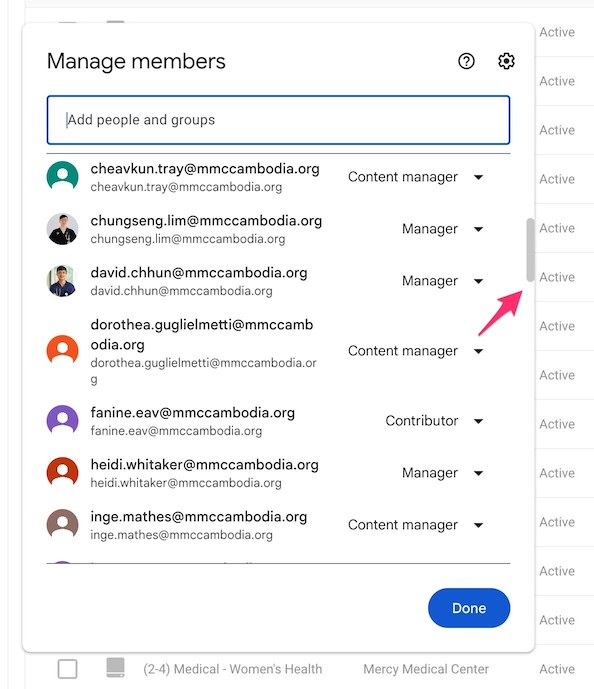
1) This is a screenshot of the OPD shared drive permissions at MMC. As you can see, there are too many people to manage. Just imagine if you managed thousands of people, this would be a nightmare. This is very difficult already.
2)
Triage1@mmccambodia.org,
Triage2@mmccambodia.org and
other non-person accounts.
The attempted solution to use one department account is worse than managing individual accounts. As soon as you share the password with more than one person or logged into a shared computer, you lose security. You will not know who did what with any files. Imagine at night, a person who is not permitted to have access walks up to a computer that’s logged in with a non-person account and plays around. You would have no idea who did what. This is a high-security risk. They could erase the whole drive or send all the files to someone outside of MMC that should not have them.
GOOGLE Workspace’s SOLUTION
Google Workspace can manage organizations with thousands of people. It actually allows you to manage multiple organizations within one license.
For daily operations, Google Workspace provides Google Groups. You can think of groups as departments within MMC. For example, you have hr.group@, lab.group@, nurse.group@ and so on. You can manage the group by who belongs to which group and then you assign drive permissions with the group address. A Google Groups email address looks identical to a regular account address but the big difference is the group address does not have a login with it. Therefore MMC needs to create new groups by adding “.group” in front of the @ symbol. For example, hr.group@mmccambodia.org or nurse.group@mmccambodia.org.
Groups are similar to departments. MMC HR should have a department chart and add the group account to them for others to use. How many departments does MMC have and who belongs to which department? Hopefully HR has this information.